Correctly prepared artwork is the key to high quality print. This page aims to give you all the information you need to prepare your artwork ready for print.
This checklist shows the specification we recommend for your artwork.
File Format
Resolution
300 dpi
We require you to send your document as single pages (in one file) and not as spreads.
The only exception to this is if you are sending us artwork for a PUR Booklet. Because this requires a spine, we would require the outside and inside cover as spreads and the rest of the booklet as a separate PDF made up of single pages.
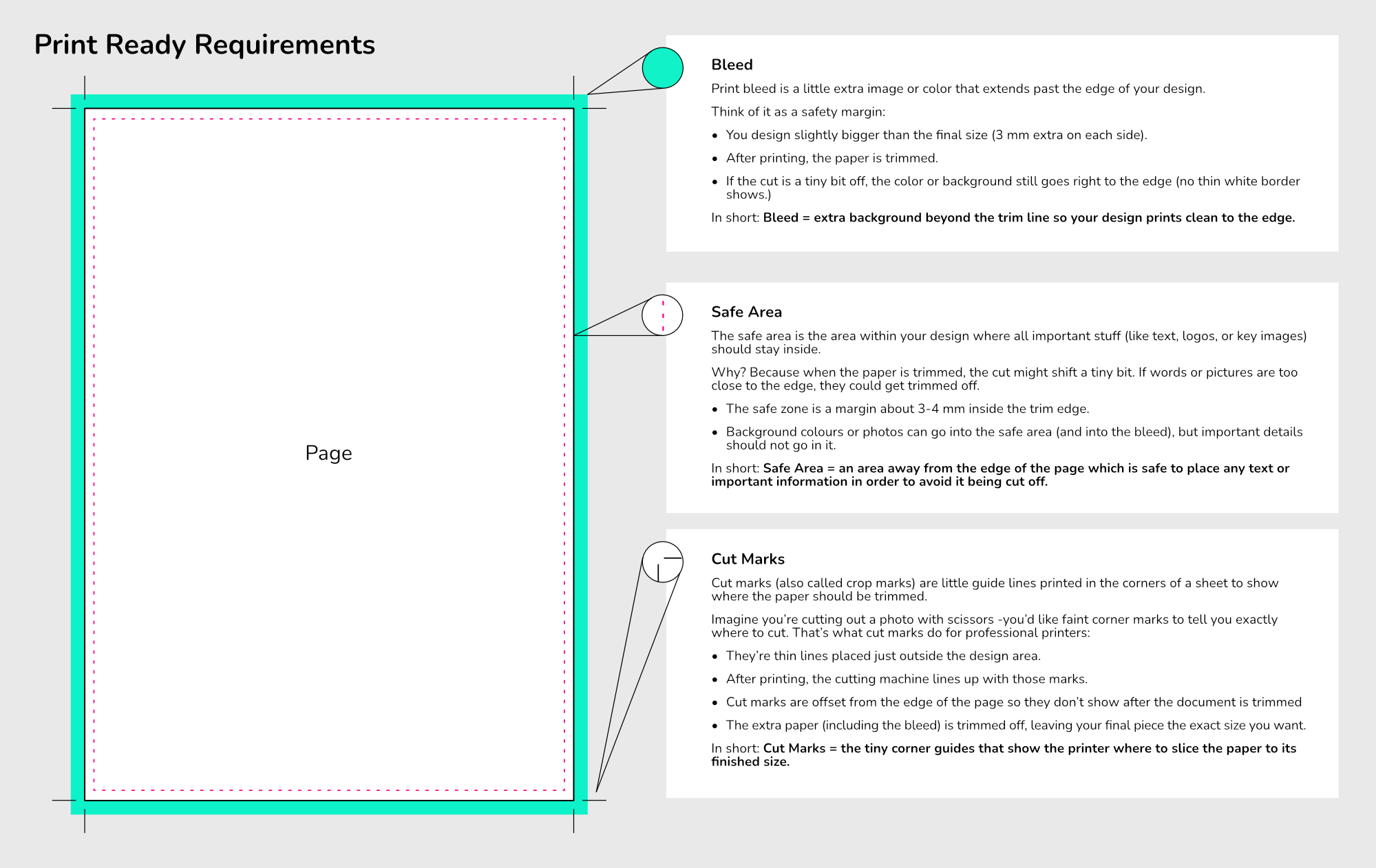
Our preference is always PDF.
Although we might accept a Microsoft Word file or a picture file (jpeg, png, tiff) we would nearly always advise you to send us your files as a PDF as it will give the most accurate results.
You can check the size of your PDF by following these steps in Adobe Acrobat Reader.
Click on FILE > PROPERTIES > now find PAGE SIZE
To change the units from inches to mm (or visa versa) click on EDIT > PREFERENCES > UNITS > change the units > click OK
You can check standard page sizes here:
Our preference is for you to email us your artwork.
Please submit your artwork to: dyerandson@gmail.com
If you have additional questions that this webpage has not solved, please call us on: 01372 373 100 and one of our friendly team will talk it through with you.